What is WebSocket
WebSocket is bidirectional, a full-duplex protocol that is used in the same scenario of client-server communication, unlike HTTP, it starts from ws:// or wss:// It is a stateful protocol, which means the connection between client and server will keep alive until it is terminated from both ends.
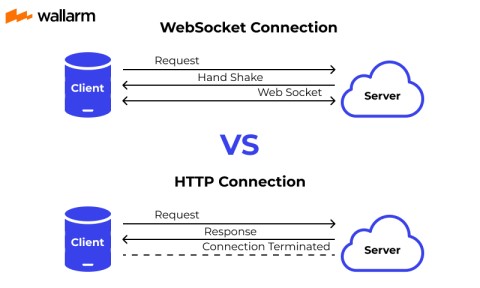
Let’s take an example of client -server communication, there is the client which is a web browser and a server, whenever we initiate the connection between client and server, the client-server made the handshaking and decide to create a new connection and this connection will keep alive until terminated by any of them. When the connection is established and alive the communication takes place using the same connection channel until it is terminated.
This is how after client-server handshaking, the client-server decides on a new connection to keep it alive, this new connection will be known as WebSocket. Once the communication link is established and the connections are opened, message exchange will take place in bidirectional mode until the connection persists between client and server. If anyone of them (client-server) dies or decides to close the connection is closed by both of the party. The way in which sockets work is slightly different from how HTTP works.
Use of WebSocket
Real-time web application
Real-time web application uses a web socket to show the data at the client end, which is continuously being sent by the backend server. In WebSocket, data is continuously pushed/transmitted into the same connection which is already open that is why WebSocket is faster and improves the application performance
For e.g in trading websites or bitcoin trading, for displaying the price fluctuation and movement data is continuously pushed by the backend server to the client end by using a webSocket channel.
Gaming application
In a Gaming application, you might focus on that, data is continuously received by the server, and without refreshing the UI, it will take effect on the screen. The UI gets automatically refreshed without even establishing the new connection, so it is very helpful in a Gaming application.
Chat application
Chat applications use WebSocket to establish the connection only once for exchange, publishing, and broadcasting the message among the subscribers. It reuses the same WebSocket connection, for sending and receiving the message and for one-to-one message transfer.
WebSocket Vs HTTP
As both HTTP and WebSocket are employed for application communication, people often get confused and find it difficult to pick one out of these two. Have a look at the below-mentioned text and gain better clarity on HTTP and WebSocket. As told previously, WebSocket is a framed and bidirectional protocol. On the contrary, to this, HTTP is a unidirectional protocol functioning above the TCP protocol. As WebSocket protocol is capable to support continual data transmission, it’s majorly used in real-time application development. HTTP is stateless and is used for the development of RESTful and SOAP applications. Soap can still use HTTP for implementation, but REST is widely spread and used. In WebSocket, communication occurs at both ends, which makes it a faster protocol. In HTTP, the connection is built at one end, making it a bit sluggish than WebSocket. WebSocket uses a unified TCP connection and needs one party to terminate the connection. Until it happens, the connection remains active. HTTP needs to build a distinct connection for separate requests. Once the request is completed, the connection breaks automatically.
Web Socket Protocol
This protocol defines a full duplex communication from the ground up. Web sockets take a step forward in bringing desktop rich functionalities to the web browsers. It represents an evolution, which was awaited for a long time in client/server web technology.
The main features of web sockets are as follows −
• Web Socket protocol is being standardized, which means real time communication between web server and clients is possible with the help of this protocol.

• Web Sockets are transforming to cross platform standards for real time communication between a client and the server.

• This standard enables new kinds of applications. Businesses for real time web applications can speed up with the help of this technology.

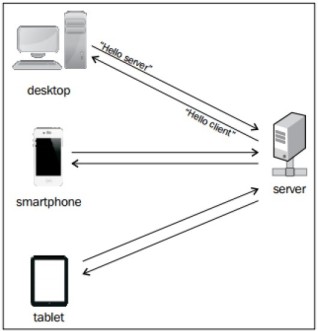
• The biggest advantage of Web Socket is it provides a two way communication (full duplex) over a single TCP connection.
Advantages of WebSocket
• It supports duplex communication.

• Using websockets, one can send and receive data immediately faster than HTTP. Moreover they are faster than AJAX.

• Cross origin communication (however this poses security risks).

• Cross platform compatibility (web, desktop, mobile)

• HTTP takes Upto 2000 bytes of overhead whereas websocket takes only 2 bytes.

• Replace long polling

• Websockets are data typed but AJAX calls can only send string data types.
Disadvantages of WebSocket
• Web browsers must be fully HTML5 compliant.

• Websockets has no success functions like AJAX.

• Intermediary/Edge caching is not possible with websockets unlike HTTP.

• To build even a simple protocol of your own, one can not be able to use friendly HTTP statuses, body etc.

• If an application does not require a lot of dynamic interaction, HTTP is much simpler to implement.
WebSocket Security
The WebSocket protocol is a young technology, and brings with it some risks. Decades of experience have taught the web community some best practices around HTTP security, but the security best practices in the websocket world aren’t firmly established.
WSS
You should strongly prefer the secure wss:// protocol over the insecure ws:// transport. Like HTTPS, WSS (WebSocket over SSL/TLS) is encrypted, thus protecting against man-in-the-middle attacks. A variety of attacks against WebSockets become impossible if the transport is secured.
Avoid tunneling
It’s relatively easy to tunnel arbitrary TCP services through a WebSocket. So you could, for example, tunnel a database connection directly through to the browser. This is very dangerous, however. Doing so would enable access to these services to an in-browser attacker in the case of a cross-site-scripting attack, thus allowing an escalation of a XSS attack into a complete remote breach.
We recommend avoiding tunneling if at all possible. Instead, develop more secured and checked protocols on top of WebSockets.
Validate client input
WebSocket connections are easily established outside of a browser, so you should assume that you need to deal with arbitrary data. Just as with any data coming from a client, you should carefully validate input before processing it. SQL Injection attacks are just as possible over WebSockets as they are over HTTP.
Validate server data
You should apply equal suspicion to data returned from the server, as well. Always process messages received on the client side as data. Don’t try to assign them directly to the DOM, nor evaluate them as code. If the response is JSON, always use JSON.parse() to safely parse the data.
Authentication
The WebSocket protocol doesn’t handle authorization or authentication. Practically, this means that a WebSocket opened from a page behind auth doesn’t “automatically” receive any sort of auth you need to take steps to also secure the WebSocket connection.
This can be done in a variety of ways, as WebSockets will pass through standard HTTP headers commonly used for authentication. This means you could use the same authentication mechanism you’re using for your web views on WebSocket connection as well.
Since you cannot customize WebSocket headers from javascript, you’re limited to the implicit auth that’s sent from the browsers. Further it’s common to have the server that handles WebSocket be completely separate from the one handling normal HTTP requests. This can make shared authorization headers difficult or impossible.
So, one pattern we’ve seen that seems to solve the WebSocket authentication problem well is a ticket based authentication system. Broadly speaking, it works like this:
• When the client-side code decides to open a WebSocket, it contacts the HTTP server to obtain an authorization ticket.

• The server generates this ticket. It typically contains some sort of user account ID, the IP of the client requesting the ticket, a timestamp, and any
  other sort of internal record keeping you might need.

• The server stores this ticket and also returns it to the client.

• The client opens the WebSocket connection, and sends along this ticket as part of an initial handshake.

• The server can then compare this ticket, check source IPs, verify that the ticket hasn’t been re-used and hasn’t expired, and do any other sort of
  permission checking. If all goes well, the WebSocket connection is now verified.
Origin header
The WebSocket standard defines an Origin header field, which web browsers set to the URL that originates a WebSocket request. This can be used to differentiate between WebSocket connections from different hosts, or between those made from a browser and some other kind of network client. However, remember that the Origin header is essentially advisory: non-browser clients can easily set the Origin header to any value, and thus “pretend” to be a browser. You can think of the Origin header as roughly analogous to the X-Requested-With header used by AJAX requests. Web browsers send a header of X-Requested-With: XMLHttpRequest, which can be used to distinguish between AJAX requests made by a browser and those made directly. However, this header is easily set by non-browser clients, and thus isn’t trusted as a source of authentication.
In the same way, you can use the Origin header as an advisory mechanism, one that helps differentiate WebSocket requests from different locations and hosts, but you shouldn’t rely on it as a source of authentication.In the same way, you can use the Origin header as an advisory mechanism, one that helps differentiate WebSocket requests from different locations and hosts, but you shouldn’t rely on it as a source of authentication.